KHIZHNYAKOV

← All templates

Renovation and Construction Project Tracker in Excel: Crew Work, Materials, Payments, Remaining Budget

Crew work log and materials purchase log, budget by section, remaining budget, amount owed to the crew, overrun highlighting and a forecast final cost.

Renovation and Construction Project Tracker in Excel: Crew Work, Materials, Payments, Remaining Budget
≈ $6.09
490 ₽
Blank template + filled-in example · Excel 2007+, LibreOffice, Google Sheets
Payment is processed securely by YooKassa in Russian rubles. If your card is declined, email us at info@хижняков.рф and we will arrange another way to pay.

What it is for

A renovation almost always costs more than planned because expenses get lost in receipts, messages and verbal agreements. Here you keep a crew work log and a purchase log, and the summary compares plan and actual for each section, shows what you owe the crew and warns about an overrun before the renovation is over.

What's inside

  • "Settings": project, dates, budget by section separately for work and materials, section completion.
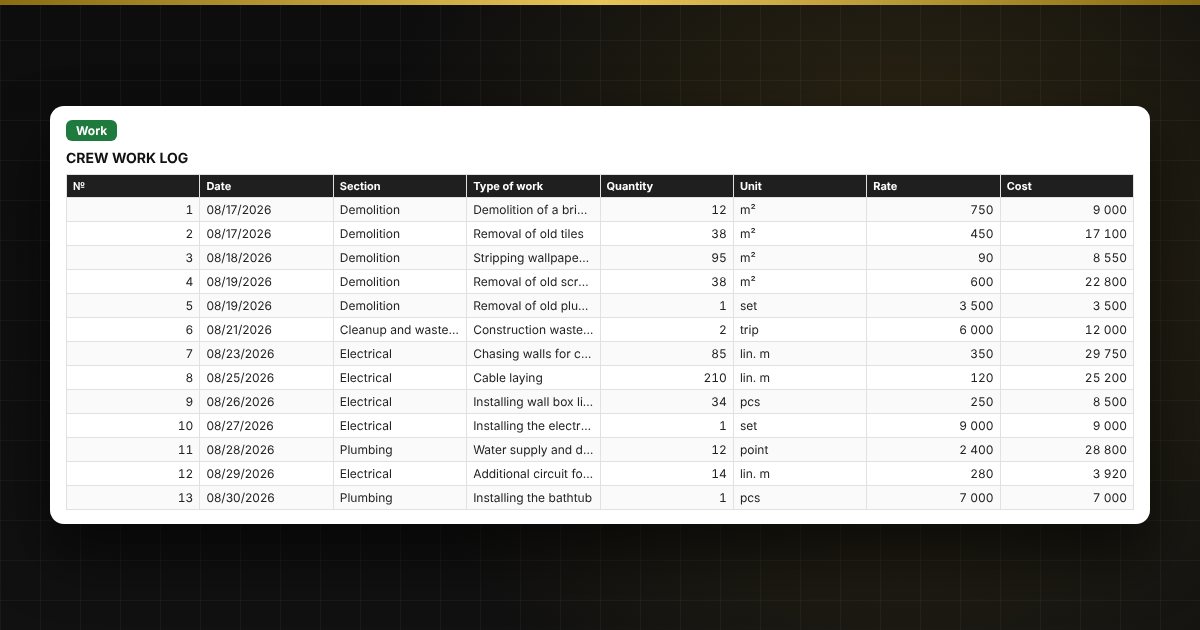
  • "Work": a log for 500 records — date, section, type of work, quantity, unit, rate, cost, paid and remaining debt to the crew.
  • "Materials": a purchase log for 500 records — material, quantity, price, amount, supplier, receipt number.
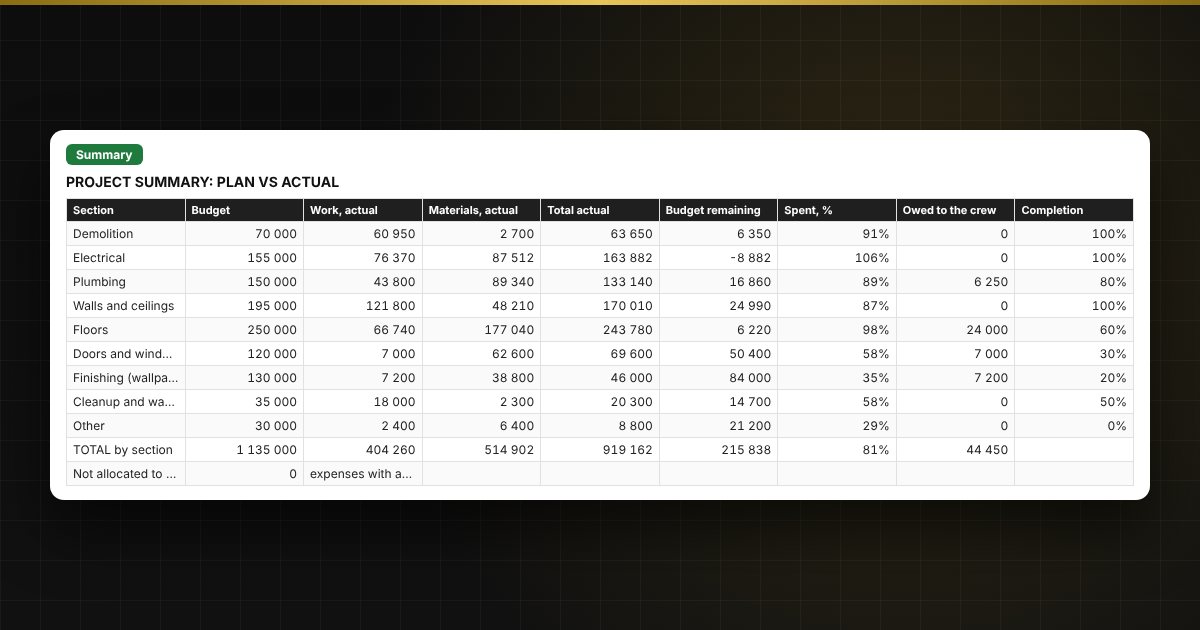
  • "Summary": plan and actual by section, remaining budget, amount owed to the crew, forecast final cost and two charts.

Who it is for

People renovating an apartment or a house or building a country home and hiring a crew, site managers and foremen running several projects, and small renovation companies.

Compatibility

Excel 2007 and later, LibreOffice. No macros. The file is in English. Rates, thresholds and standard values are placed in the settings: check them against your own contracts and local requirements before use. The calculation is approximate.

📘 How to Track Renovation Costs in Excel: Crew Work, Materials and Budget

Questions and answers

How does the spreadsheet show an overrun?
Work and material expenses are summed by section and compared with the budget. If the actual exceeds the budget, the remaining amount becomes negative and is highlighted in red.
How is the amount owed to the crew calculated?
The cost of each job is the quantity multiplied by the rate. The amount paid is subtracted from it, and the remainder is shown for each job and for the project as a whole.
How is the forecast final cost calculated?
Work is divided by the section completion, which you enter in percent, and materials are added at actual or at budget if that is higher. It is an estimate, not an exact cost estimate.
What happens if a section is entered incorrectly?
Such expenses are highlighted in red and appear on the "Not allocated to sections" line so that you do not lose them in the totals.