KHIZHNYAKOV
How to Calculate Marketing ROI by Channel in Excel: CPL, CAC, ROAS and ROMI
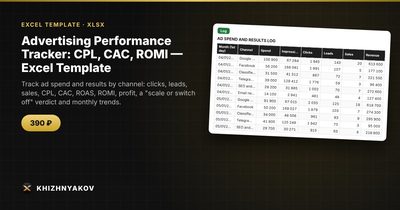
Advertising Performance Tracker: CPL, CAC, ROMI — Excel Template — Open the template →
Most small businesses advertise in several places at once: search ads, social media, local directories, a newsletter. Each platform's dashboard says it is doing great. The bank balance tells a less clear story.
To know which channel actually pays off, you need the same few metrics calculated the same way for every channel, using your own sales data rather than the platforms' attribution. This guide shows how to set that up in Excel with one log, a handful of formulas and a simple decision rule.
Step 1. A monthly log per channel
Once a month, add one row per channel:
| Month | Channel | Spend | Impressions | Clicks | Leads | Sales | Revenue |
|---|---|---|---|---|---|---|---|
| Oct | Google Ads | 2,000 | 160,000 | 4,000 | 80 | 16 | 9,600 |
| Oct | 1,500 | 220,000 | 2,600 | 30 | 4 | 2,400 |
Spend comes from the ad platform; leads, sales and revenue should come from your CRM, form submissions or sales records. If you don't know which channel a customer came from, start by asking ("How did you hear about us?") and using UTM tags on links.
Step 2. The funnel metrics
| Metric | Formula | Google Ads | |
|---|---|---|---|
| CTR | clicks / impressions | 2.5% | 1.2% |
| CPC | spend / clicks | $0.50 | $0.58 |
| CPL | spend / leads | $25 | $50 |
| Lead to sale | sales / leads | 20% | 13% |
| CAC | spend / sales | $125 | $375 |
In Excel, wrap each division in IFERROR so a month with zero leads doesn't produce #DIV/0!: =IFERROR(C2/F2,"").
CPL and CAC are usually more useful than CTR and CPC. Cheap clicks that never become customers are not cheap.
Step 3. ROAS vs ROMI: the margin trap
ROAS (return on ad spend) = revenue / spend. Google Ads: 9,600 / 2,000 = 4.8, or 480%. Looks excellent.
But revenue is not profit. If your gross margin (revenue minus the cost of goods or services, before advertising) is 35%, then those $9,600 of sales generate only $3,360 of gross profit.
ROMI (return on marketing investment) = (gross profit − spend) / spend.
- Google Ads: (3,360 − 2,000) / 2,000 = +68%. Profitable.
- Facebook: (840 − 1,500) / 1,500 = −44%. Losing money, despite a ROAS of 1.6 that some dashboards would show in green.
In Excel, with margin in a settings cell named Margin: =IFERROR((H2*Margin-C2)/C2,"").
Break-even ROAS is 1 / margin. At 35% margin, you need ROAS of about 2.86 just to cover ad costs.
Step 4. A decision rule
Pick thresholds in advance so the monthly review doesn't turn into an argument:
- ROMI above, say, 50%: scale: add budget gradually and watch whether ROMI holds.
- ROMI between 0 and 50%: keep and optimize (targeting, landing page, offer).
- ROMI below 0: loss-making: fix or switch off.
A nested IF gives you the label: =IF(R2<0,"Loss-making",IF(R2>=0.5,"Scale","Keep")).
Step 5. Totals by channel and by month
Use SUMIFS to add spend, leads, sales and revenue by channel for the year, then calculate the metrics from those totals. Don't average monthly percentages; recalculate from summed numbers, or small months will distort the result.
A month-by-month view (total spend, CPL, CAC, ROMI) shows trends: rising CPL often means audience fatigue or more competition in the auction.
Common mistakes
- Judging by ROAS without margin. The most expensive mistake on this list.
- Using platform-reported conversions as sales. Platforms count generously; use your own records.
- Ignoring time lag. If deals take six weeks, a January lead closes in March. Look at quarters, or record sales in the month of the lead.
- Lumping campaigns together. Search and display campaigns on the same platform can have opposite results. Split them into separate channels.
Ready-made template: Advertising Performance Tracker
The Advertising Performance Tracker (CPL, CAC, ROMI) is a paid Excel template that does this monthly report for you.
- "Settings": year, margin, ROMI threshold and a list of up to 10 advertising channels. You can split one platform into several channels, for example "Google Ads — Search" and "Google Ads — Display."
- "Log": up to 400 rows with month, channel, spend, impressions, clicks, leads, sales and revenue; profit and ROMI for each row are calculated automatically.
- "Channels": CTR, CPC, CPL, conversion to sale, CAC, ROAS, profit, ROMI and a "scale", "keep" or "loss-making" verdict for each channel, with totals and a chart.
- "By month": spend, leads, sales, revenue, CPL, CAC, profit and ROMI by month, with a chart.
It works in Excel 2007 and later and in LibreOffice, with ordinary formulas and no macros. The calculation is indicative.
FAQ
What is a good CAC?
One that is comfortably below the gross profit a customer brings over their lifetime. If customers buy repeatedly, a CAC higher than the first order's profit can still be fine. Compare CAC with lifetime gross profit, not with first-order revenue.
Where do I get my margin?
From your accounts: (revenue − cost of goods or services) / revenue, before marketing costs. If margins differ widely between products, use the margin of what each channel actually sells.
Should I include agency fees and design costs in spend?
Yes, if you want true ROMI. Add them to the channel they relate to, or create a separate "Production" line and spread it across channels.
How long should I test a new channel before deciding?
Long enough to get a meaningful number of leads, often at least 30–50. Decisions based on five leads are mostly noise.