KHIZHNYAKOV
How to Track Car Expenses and Fuel Economy in Excel
Car Expense Tracker — Excel Template — Open the template →
Ask a driver how much their car costs and most will name the monthly payment or the gas bill. The real number is much higher once insurance, maintenance, tires, registration, parking and car washes are added. Without tracking, it's also easy to miss an oil change by a few thousand miles.
A simple Excel log solves both problems. You record fill-ups and other expenses as they happen, and the spreadsheet calculates fuel economy, cost per mile and when the next service is due. Here's how.
Step 1. Log fill-ups the right way
Fuel economy is only accurate if you fill the tank to full every time and record the odometer.
| Date | Odometer | Gallons | Price/gal | Total |
|---|---|---|---|---|
| 10/02 | 42,310 | 11.4 | $3.29 | $37.51 |
| 10/12 | 42,640 | 11.2 | $3.35 | $37.52 |
| 10/23 | 42,995 | 12.0 | $3.19 | $38.28 |
Fuel used on each fill-up belongs to the miles driven since the previous one:
- Miles since last fill-up:
=B3-B2→ 330 - MPG:
=(B3-B2)/C3→ 330 / 11.2 ≈ 29.5 mpg - Fuel cost per mile:
=E3/(B3-B2)→ $37.52 / 330 ≈ $0.114
If you think in liters per 100 km instead: L/100 km = liters / km × 100. To convert, L/100 km ≈ 235.2 / mpg, so 29.5 mpg is about 8.0 L/100 km.
A sudden drop in fuel economy can be an early sign of a problem: underinflated tires, a dragging brake, a sensor issue.
Step 2. Everything else goes in one expense log
Date, odometer, category, description, amount. Categories that cover most cars:
- Insurance
- Maintenance (oil, filters, inspections)
- Repairs
- Tires
- Registration and taxes
- Parking and tolls
- Washing and cleaning
- Other
Record the odometer here too. It tells you when each job was done, and lets the sheet know the current mileage.
Step 3. Current mileage
Current mileage = the highest odometer reading in either log:
=MAX(MAX(Fuel!B:B),MAX(Expenses!B:B))
This is why a typo like 429,950 instead of 42,995 matters: it will break every reminder. Data validation (whole number between the previous reading and +2,000) catches most mistakes.
Step 4. Service reminders by mileage and date
Most maintenance has two intervals, whichever comes first: miles and months. For each job record the last time it was done:
| Job | Every (mi) | Every (months) | Last done (mi) | Last done (date) |
|---|---|---|---|---|
| Oil and filter | 5,000 | 6 | 40,100 | 06/15 |
| Tire rotation | 7,500 | 12 | 37,800 | 02/10 |
| Brake fluid | 30,000 | 24 | 21,000 | 03/05/25 |
- Next due mileage:
=D2+B2 - Next due date:
=EDATE(E2,C2) - Status:
=IF(OR(current>=next_mi,TODAY()>=next_date),"Overdue",IF(OR(next_mi-current<=500,next_date-TODAY()<=30),"Due",""))
Check your owner's manual for the right intervals; they vary by car and driving conditions.
Step 5. True cost per mile
Total cost per mile = all expenses (fuel + everything else) / miles driven in the period.
If you spent $2,100 on fuel and $3,300 on insurance, maintenance, registration and parking in a year, and drove 12,000 miles, your cost is $5,400 / 12,000 = $0.45 per mile, before depreciation and loan payments. That number is useful when comparing a second car with rideshares, or deciding whether a long road trip is cheaper than flying.
For business use, keep a separate mileage log as your tax authority requires; this sheet is about understanding costs.
Step 6. A monthly summary
SUMIFS by month and category gives a grid that shows seasonality (winter tires, annual insurance) and trends. A stacked column chart makes it easy to see when repairs start to outweigh everything else, a classic sign it's time to think about replacing the car.
Common mistakes
- Partial fill-ups. They make one reading look terrible and the next one amazing.
- Forgetting small items. Parking and car washes can add hundreds a year.
- Only tracking fuel. That's often less than half of the real cost.
- Not recording odometer with service. Without it, reminders can't work.
Ready-made template: Car Expense Tracker
The Car Expense Tracker is a paid Excel template that puts all of this in one file.
- "Car": vehicle details, starting mileage and expense categories.
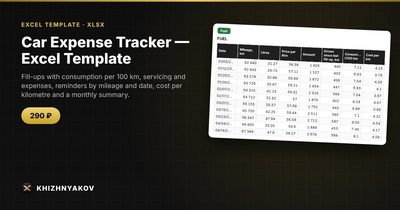
- "Fuel": date, mileage, liters and price; consumption per 100 km and cost per kilometer are calculated for you (fill the tank to full each time).
- "Expenses": other costs by category.
- "Service": scheduled jobs with intervals in kilometers and months and a "Due" or "Overdue" status. Current mileage is taken as the highest value from fill-ups and expenses.
- "Summary": totals, expenses by month and category, and a chart.
Note that the template is set up for liters and kilometers. It works in Excel 2007 and later and in LibreOffice, with no macros. Calculations are approximate.
FAQ
Should I include the car payment?
For a full picture of what the car costs you, yes, as its own category. For cost-of-driving comparisons, many people leave financing out and look at running costs only.
How do I track two cars?
Use one file per car. Mixing them in one log makes fuel economy and service reminders unreliable.
Is the trip computer's mpg accurate?
It's often a little optimistic. Calculating from fill-ups gives you the real figure over time.
How do I handle a repair that is partly covered by warranty?
Record only what you paid. Add a note with the warranty claim so you remember what was replaced.