KHIZHNYAKOV
How to Plan an Event Budget in Excel (with Checklist)
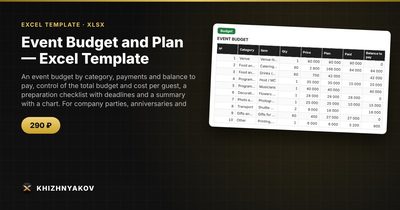
Event Budget and Plan — Excel Template — Open the template →
Most events do not go over budget because of one huge expense. They go over because a dozen small ones, such as extra chairs, a late photographer fee, or a tip nobody planned for, quietly pile up while the deposit schedule and the to-do list live in different places.
This guide shows a method that works for a company party, an anniversary, a conference or a family celebration. You will build a budget by category, track what is paid and what is still owed, work out the cost per guest, and keep a checklist where overdue tasks are visible. It all fits on two or three sheets.
Step 1: Set the frame
Before you list a single cost, write down three numbers in a settings area: the date, the number of guests and the total budget. Everything else is measured against these.
Then list your categories. A sensible default is venue, catering, drinks, entertainment, decor, photo and video, transport, gifts and a reserve. Categories matter because they let you see at a glance where the money goes and compare with the next event.
Step 2: List every cost as quantity times price
Create a table with these columns: item, category, quantity, unit price, planned total, paid, balance. The plan is =C2*D2 and the balance is =E2-F2.
Here is a company party for 40 guests with a $6,000 budget:
| Item | Category | Qty | Price | Plan | Paid |
|---|---|---|---|---|---|
| Venue hire | Venue | 1 | 1,800 | 1,800 | 900 |
| Dinner | Catering | 40 | 55 | 2,200 | 0 |
| DJ | Entertainment | 1 | 600 | 600 | 150 |
| Table decor | Decor | 1 | 350 | 350 | 0 |
| Photographer | Photo | 1 | 450 | 450 | 0 |
| Gifts | Gifts | 1 | 400 | 400 | 0 |
The planned total is =SUM(E2:E7), which gives $5,800. That is $200 under budget, or 3.3 percent of the total. Cost per guest is =SUM(E2:E7)/guests, so $5,800 divided by 40 is $145.
Step 3: Add a reserve and watch the status
That $200 cushion looks comfortable but it is not. A reserve of 10 percent of the plan would be $580, which would take the total to $6,380, or $380 over budget. It is far better to discover this on paper now, so you can drop the photographer to a shorter package or cut the guest list by two, than on the day.
Add a status cell that tells you plainly where you stand:
=IF(SUM(E2:E7)<=Budget,"Within budget","Over by "&TEXT(SUM(E2:E7)-Budget,"#,##0"))
Use =SUMIF(B:B,"Catering",E:E) to total any category, and build a small plan-versus-actual table from it. A column chart of those categories is usually all the stakeholders want to see.
Step 4: Track payments, not just costs
“Paid” and “balance” columns matter more than they seem. Suppliers want deposits at specific dates, and nothing wrecks a cash flow like discovering on Thursday that $1,450 is due on Friday. Total the balance column to see what you still owe, and add a due-date column if payments are staged.
Step 5: Build the checklist
Create a second table with the task, who is responsible, deadline and status. Overdue is a simple formula:
=IF(AND(C2<TODAY(),D2<>"Done"),"Overdue",IF(AND(C2-TODAY()<=7,D2<>"Done"),"Due soon",""))
Add conditional formatting to colour “Overdue” red. Work backwards from the event date: venue and catering confirmed 8 weeks out, invitations 6 weeks out, final headcount to the caterer a week before.
Common mistakes
- Forgetting per-head costs that scale. Catering, drinks and gifts change with guest count. Keep the quantity linked to the guest cell rather than typing 40.
- No reserve. Allow 5 to 10 percent for surprises.
- Mixing estimates and quotes. Mark items that are only estimates so you know which numbers can still move.
- Tracking tasks on paper. If the checklist is not next to the budget, deadlines get missed.
Ready-made template
The “Event Budget and Plan” template is a paid file that does all of the above. You do not have to set up the formulas.
- “Settings” holds the event, date, number of guests, total budget and the list of categories, which you can change.
- “Budget” takes up to 60 items with category, quantity, price and amount paid; plan, balance and status are calculated automatically.
- “Checklist” holds up to 40 tasks with a responsible person, deadline and status, with “Due soon” and “Overdue” alerts.
- “Summary” shows plan and actual by category, remaining budget, cost per guest, progress and a chart.
The summary shows “Within budget” or “Over by” with the amount exceeded. The file works in Excel 2007 and newer and in LibreOffice, with ordinary formulas and no macros.
FAQ
How much of the budget should be a reserve?
Between 5 and 10 percent is common for events with many suppliers. If you are booking a venue for the first time or have no previous event to compare with, lean towards 10 percent.
Should cost per guest include the venue?
Yes, for budgeting. Divide the total planned cost by the number of guests, then also look at the variable cost per guest (catering, drinks, gifts) to see how adding ten people would change the total.
What if the guest count changes late?
If your quantities are linked to a guest-count cell, update it once and the catering lines recalculate. Fixed costs like venue hire stay the same, so cost per guest will move accordingly.
Can I use the same sheet for a wedding?
The method works. Wedding budgets usually need more categories and a separate guest list, so adjust the category list accordingly.