KHIZHNYAKOV
Salon Appointment Booking Spreadsheet in Excel with Overlap Check
Client Booking Tracker for Salons and Studios — Excel Template — Open the template →
Salons, barbershops and studios have the same recurring problem: bookings arrive through calls, messages and walk-ins, and they end up in a paper diary, a phone calendar and someone's memory. Eventually two clients are booked at the same time for the same stylist, and one of them is unhappy.
You can stop that with an Excel booking sheet that checks for conflicts for you. This guide shows how to set up services and staff, calculate end times and prices, flag overlaps and track no-shows.
Start with two lists
Services. Name, duration in minutes, price. For example: Haircut, 45 min, $35; Color, 120 min, $90; Manicure, 60 min, $40.
Staff. The names of the people who take bookings.
Put these in a Lists sheet. Everything else will pick from them, which keeps spelling consistent and means a price change happens in one place.
The booking row
Each booking is one row. You type: date, start time, client, phone, service (dropdown), staff member (dropdown), discount, status. The sheet calculates the rest.
- Price:
=VLOOKUP(service,Services!A:C,3,FALSE)*(1-discount) - Duration:
=VLOOKUP(service,Services!A:C,2,FALSE) - End time:
=start_time+duration/1440, because Excel stores time as a fraction of a day and a day has 1,440 minutes.
Statuses to use: Booked, Attended, Cancelled, No-show. Revenue should count only Attended bookings.
Detect overlaps automatically
This is the feature that saves you. A booking overlaps another if it is for the same staff member on the same date, starts before the other ends and ends after the other starts. In a helper column:
=IF(COUNTIFS(Staff,E2,Date,A2,Start,"<"&End2,End,">"&Start2)>1,"Overlap","")
The count includes the row itself, so more than 1 means a conflict. Add conditional formatting to turn the row red when it says Overlap. You still decide what to do, but you see it before the client arrives.
Make sure to exclude cancelled bookings from the check, or a cancelled slot will block new ones. Add Status,"<>Cancelled" to the COUNTIFS.
A worked example
Monday, stylist Kim:
| Start | Service | Duration | End |
|---|---|---|---|
| 10:00 | Haircut | 45 min | 10:45 |
| 10:30 | Color | 120 min | 12:30 |
| 11:00 | Manicure | 60 min | 12:00 |
The first two overlap from 10:30 to 10:45, and so do the second and third. The sheet marks the second booking, which collides in both directions. You move the color to 10:45 and everything is fine.
The day view
A daily schedule sheet is what the team actually uses. Enter a date in one cell, and list the bookings of that day in time order, with client name, phone and service. In current Excel, =SORT(FILTER(...)) makes this simple. In older versions, filter the bookings table by date and sort by time.
Measuring the business
Once bookings are structured, the summary is easy:
- Revenue by staff member, service and month using SUMIFS on Attended bookings.
- Average order value: revenue divided by attended bookings.
- No-show rate: no-shows divided by all bookings that were not cancelled in advance. If it is above 10%, consider reminders or a deposit.
Common mistakes
- Storing time as text. "2pm" will not calculate. Use real times.
- Forgetting buffer time. If you need ten minutes to clean up, include them in the service duration.
- Counting cancelled bookings as revenue.
- Letting staff type service names. Use dropdowns.
- Not keeping client phone numbers handy. Show them on the day view, since that is where you need them.
Ready-made template
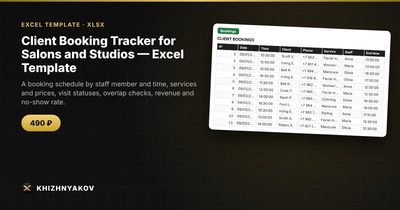
The Client Booking Tracker for Salons and Studios is a paid Excel template that does all of this. It has four sheets: "Lists" (services with duration and price, and staff), "Bookings" (up to 1500 bookings with date, time, client, phone, service, staff member, discount, status and payment, plus an overlap check), "Day" (the schedule for the chosen date in time order, with client phone numbers) and "Summary" (revenue by staff member, service and month, average order value, no-show rate and a chart).
Price and end time are calculated automatically, and if the same staff member has another booking on the same day whose time overlaps, the row is marked and highlighted in red. Only bookings with the status "Attended" count toward revenue. It supports up to 15 staff members and 20 services. It suits stylists and owners of beauty salons, barbershops, nail studios and massage studios, photographers, tutors and independent specialists. It comes as a blank spreadsheet and a filled-in sample with fictional data, works in Excel 2007 and later and LibreOffice, with no macros. Calculations are approximate.
FAQ
Can clients book themselves through the spreadsheet?
No. It is an internal tool for you and your team. You enter bookings as they arrive by phone, message or in person.
How do I handle a service that needs two staff members?
Enter two rows, one for each person, with the same time. The overlap check works per staff member, so it will not complain.
How do I reduce no-shows?
Send a reminder the day before, using the phone numbers on the day view. A small deposit for long services also helps.
Do I need to keep old bookings?
Keep them for the revenue statistics. When the file grows heavy after a year or more, save an archive copy and start a new file.