KHIZHNYAKOV
How to Plan a Vacation Budget in Excel
Vacation and Travel Budget Planner — Excel Template — Download free →
Trips almost always cost more than planned. Not because of one big surprise, but because of dozens of small things: the airport train, tourist taxes, a dinner that turned out to be twice the price on the menu. And the packing list is usually written the night before, when it's too late to buy what you forgot.
A spreadsheet keeps all of that under control. In this guide you will set a budget with a reserve, log expenses in any currency with automatic conversion to dollars, split planned and paid costs, and keep the packing checklist next to the money.
Step 1. Trip settings
Start with the basics in one block:
| Setting | Example |
|---|---|
| Dates | June 12–19 (7 nights) |
| Travelers | 2 |
| Budget | $4,000 |
| Contingency reserve | 10% |
| Home currency | USD |
The reserve is not "extra money to spend." It is a buffer for prices you can't know in advance.
Step 2. A currency table
List the currencies you will use and their rate to your home currency:
| Currency | Rate to USD |
|---|---|
| USD | 1.00 |
| EUR | 1.08 |
| CHF | 1.12 |
Use a realistic rate: what your bank or card actually charges, including fees, not the mid-market rate on a news site. Update the table before you leave.
Step 3. An expense log
One row per expense with: date, category, description, amount, currency, status, amount in USD.
Conversion formula with the currency in E2, the amount in D2 and the rate table in a range named Rates:
=D2*VLOOKUP(E2,Rates,2,FALSE)
A hotel night of €120 becomes 120 × 1.08 = $129.60.
Categories that work for most trips: flights, accommodation, local transport, food, activities and tickets, shopping, insurance, other.
Step 4. Planned vs paid
Add a status column with two values: Planned for costs still to come and Paid for money already spent. Before the trip almost everything is planned; during the trip rows switch to paid. This tells you two different things:
- Total of all rows: what the trip will cost.
- Planned rows in each foreign currency: how much cash or card balance you still need on the spot.
=SUMIFS(D:D,E:E,"EUR",F:F,"Planned") returns the euros you still have to pay locally.
Step 5. Compare with the budget, including the reserve
Forecast = total expenses × (1 + reserve)
If planned and paid rows add up to $3,550, the forecast with a 10% reserve is $3,905. Remaining budget: $4,000 − $3,905 = $95. Tight, but within the plan. If the remainder is negative before you even leave, cut something now rather than at the last restaurant.
Two more useful figures:
- Per person: $3,550 / 2 = $1,775
- Per day: $3,550 / 7 ≈ $507
Step 6. A day-by-day itinerary
A simple table with day, city, plan and expected spending per day helps you see which days are expensive (museum passes, day trips) and which are cheap. Compare it to the per-day figure from step 5.
Step 7. Packing checklist
Keep the list in the same workbook: item, group (documents, clothes, toiletries, electronics, medicine), quantity and a "packed" mark. A progress formula like =COUNTIF(D:D,"x")/(COUNTA(A:A)-1) (minus one for the header) gives a percentage you can watch fill up.
Start the list a week before departure, and reuse it next time.
Common mistakes
- Using the mid-market exchange rate. Card and ATM fees can add 1–3%.
- Forgetting small recurring costs. Daily coffee, metro rides and tips add up fast over a week.
- No reserve. Ten percent is a reasonable default; more for long or remote trips.
- Mixing currencies in one total. Always convert before summing.
Ready-made template: Vacation and Travel Budget Planner
The free Vacation and Travel Budget Planner brings the itinerary, money and packing list together.
- "Itinerary": trip settings (dates, number of people, budget, reserve), a currency table with rates and a day-by-day plan with spending for each day.
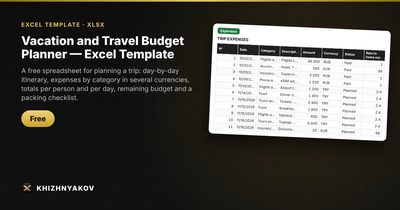
- "Expenses": up to 500 rows with date, category, description, amount, currency and a "Planned" or "Paid" status; amounts are converted to your home currency automatically.
- "Checklist": up to 150 items with group, quantity and a "packed" mark.
- "Summary": totals by category, remaining budget with the reserve, spending per person and per day, foreign currency still needed, packing progress and two charts.
It works in Excel 2007 and later and in LibreOffice, with no macros. Calculations are approximate.
FAQ
How much should I budget per day?
It depends entirely on the destination and travel style. A good method: estimate one typical day in detail (meals, transport, one paid activity), multiply by the number of days, then add flights, accommodation and the reserve.
Should I pay in local currency or dollars when a card terminal asks?
Usually local currency. Choosing dollars at the terminal lets the merchant's bank set the exchange rate, which is often worse.
Do I need to log every small purchase during the trip?
Not necessarily. Many travelers log big items as they go and add one "cash spent" row per day. The goal is to know where you stand, not to audit every pretzel.
Can I use it for a group trip?
Yes. Set the number of travelers and use the per-person figure to split costs. For complex sharing, add a "paid by" column to the expense log.