KHIZHNYAKOV
Real Estate Agent Tracking Spreadsheet: Properties, Viewings, Commission
Real Estate Agent Tracker — Properties, Viewings and Deals Excel Template — Open the template →
Most agents start with a notebook, then add a phone full of notes, then a spreadsheet for prices, and soon nobody can say with confidence which client was promised a callback on Thursday. The cost is rarely dramatic. It is a viewing that got double-booked, a seller who was not updated, a buyer who went cold because nobody followed up.
You do not need a full CRM to fix this. A small, well-structured Excel workbook with four tables is enough for an independent agent or a small agency. This guide explains the structure, the formulas, and a worked example of expected commission, then shows where a ready-made file can save you the setup.
The four tables every agent needs
Think in terms of objects and events, not one giant list.
- Properties. One row per listing: address, type, asking price, status (for example Active, Under offer, Sold, Withdrawn), owner, commission percentage.
- Viewings. One row per showing: date, client, property, result (interested, thinking, not interested, offer made), and the next contact date.
- Deals. One row per closed sale or lease: property, date, final price, commission.
- Call list. Not typed by hand. It is a filtered view of clients whose next contact date has arrived.
Keeping these separate means you enter a fact once. A viewing is recorded in Viewings, and nothing else needs retyping.
Expected commission, with numbers
Expected commission is the simplest forecast you can build, and it keeps your attention on the listings that pay.
Suppose you have three active listings:
| Property | Asking price | Commission rate | Expected commission |
|---|---|---|---|
| 12 Maple St | $420,000 | 2.5% | $10,500 |
| 8 Lake View, Apt 4 | $265,000 | 3.0% | $7,950 |
| 301 Oak Ave | $510,000 | 2.0% | $10,200 |
The formula in the last column is =C2*D2 for price times rate. The total expected, if all three sold at asking, is $28,650. That is the optimistic number. Be honest with yourself and add a column "Probability" (for example 30%, 50%, 70%) and a weighted figure =E2*F2. A weighted pipeline of $12,000 tells you more about next month's income than the $28,650 headline.
Build the reminder list
The most valuable feature is the one that answers: who do I call today?
- In Viewings, add a column "Next contact" and fill it in every time you speak to a client. Even "in two weeks" is a date.
- Add a column "Due?" with
=IF(AND(F2<>"",F2<=TODAY()),"Call",""). - On a Call list sheet, pull the due rows. In current Excel you can use
=FILTER(Viewings!A2:F500,Viewings!G2:G500="Call"). In older versions, sort or filter the Viewings table by the Due column. - After each call, change the Next contact date. If you do not, the client stays on the list tomorrow, which is exactly the nudge you want.
Track viewings so they mean something
A viewing with a blank result is wasted information. Use a short, fixed list of results via Data Validation (Data, Data Validation, List). Five options are enough: Interested, Thinking, Not interested, Offer, No-show. After a month, a simple =COUNTIF(Viewings!E:E,"Offer")/COUNTA(Viewings!E2:E500) shows what share of viewings produce an offer. That ratio is your real conversion rate and it will tell you whether you need better photos, better pricing or better qualifying of buyers.
Common mistakes
- Mixing statuses in free text. "sold", "Sold!", "SOLD" are three different values to a filter. Use a dropdown.
- Overwriting the price. If the price drops, add a note or a new row so you can see the history. Sellers sometimes forget how many reductions they agreed to.
- No next contact date. Without it there is nothing to remind you.
- Storing client data carelessly. The file holds names and phone numbers. Keep it on your own computer, protect it with a password or encrypted disk, and do not email it around.
- Forgetting limits. A workbook with formulas in 10,000 rows gets slow. Archive closed deals every year and start fresh.
Ready-made template
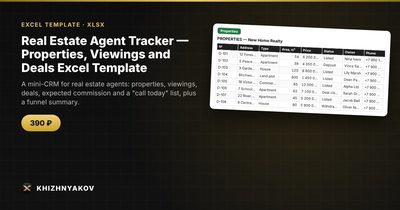
If you want to skip the setup, the Real Estate Agent Tracker is a paid Excel template built as a mini-CRM. Its sheets are "Properties" (address, type, price, status, owner, commission), "Viewings" (date, client, property, result), "Deals" (closed deals and commission) and "Call List" (clients due for a call, plus a summary with the funnel).
The commission is calculated from the percentage in "Settings" times the property price, and a client appears in "Call List" when the next contact date arrives. The file holds up to 100 properties and 400 viewings. It comes as a blank template plus a filled-in sample with fictitious data, so you can see how the formulas work before you enter your own. It works in Excel 2007 and later and in LibreOffice, uses ordinary formulas and no macros. Check the percentages and thresholds in the settings before use, as the calculations are approximate.
FAQ
Is Excel good enough compared with a real CRM?
For one agent or a small team with up to a few hundred contacts, yes. You lose automatic email integration and mobile apps, but you gain full control and no monthly fee. If you outgrow it, your clean tables export easily to a CRM.
How many follow-ups should I schedule per client?
It depends on the market and the client's urgency. A common approach is a short interval, such as two to three days, after a viewing, and then weekly or biweekly for undecided buyers. What matters is that every contact ends with a next date.
Can I use it for rentals as well as sales?
Yes, if you treat a rental as a deal with a monthly figure. Add "Sale" or "Rent" in the type column and keep the commission rate per listing.
How should I back up the file?
Keep one copy on your computer and one in an encrypted cloud folder or on an external drive. Save a dated copy at the end of each month.