KHIZHNYAKOV
Store Sales Tracker in Excel: Profit, Markup and ABC Analysis
Store Sales and Revenue Tracker — Excel Template — Open the template →
A cash register or point-of-sale system tells you how much you sold. It rarely tells you where you actually earn money. Two products may bring in the same revenue, while one earns a 60% markup and the other barely covers its cost. Without that picture you tend to push whatever sells most, not whatever pays most.
You can get that picture from a simple sales log in Excel. This guide explains which columns to keep, how to calculate profit and markup, and how to run an ABC analysis to find the products that carry your business.
The sales log: one sale, one row
Keep the log flat, with one row for every sale line:
| Date | Product | Qty | Discount | Salesperson | Payment |
|---|---|---|---|---|---|
| 11/03/2026 | Canvas tote bag | 2 | 0% | Anna | Card |
Next to these entered columns, add calculated ones, filled from a product list that has the purchase price and the retail price for every product:
- Price:
=VLOOKUP(B2,Products!B:E,4,FALSE)to pull the retail price. - Revenue:
=C2*price*(1-D2). - Cost:
=C2*VLOOKUP(B2,Products!B:E,3,FALSE)using the purchase price. - Profit:
=revenue-cost. - Markup:
=profit/cost.
Markup versus margin
These two get mixed up all the time. Markup is profit divided by cost. Margin is profit divided by revenue. A product that costs $10 and sells for $15 has a markup of 50% and a margin of 33%. If you want a 33% margin, you need a 50% markup. Decide which one you use in your business and label the column clearly.
ABC analysis in four steps
ABC analysis sorts your products by their contribution to revenue. The common rule: group A is the products that make up the first 80% of revenue, group B the next 15%, group C the remaining 5%.
- Sum revenue per product with SUMIF.
- Sort the products by revenue, highest first.
- Calculate each product's share of the total, and then a cumulative share.
- Label the group: A if the cumulative share is up to 80%, B up to 95%, C above.
A worked example
| Product | Revenue | Share | Cumulative | Group |
|---|---|---|---|---|
| Canvas tote bag | $4,200 | 42% | 42% | A |
| Ceramic mug | $2,800 | 28% | 70% | A |
| Candle set | $1,200 | 12% | 82% | B |
| Notebook | $900 | 9% | 91% | B |
| Postcards | $600 | 6% | 97% | C |
| Stickers | $300 | 3% | 100% | C |
Total revenue is $10,000. Two products bring 70% of it. Your task is not to delete group C, but to ask different questions: for A, never run out of stock and watch the price; for C, are these products worth the shelf space or do they bring customers in?
Reading the numbers by day, month and person
Beyond ABC, three summaries are cheap and useful:
- By weekday. SUMIF over a helper column
=TEXT(A2,"ddd"). You may find that Tuesday is dead and Saturday is double. Staff your shop accordingly. - By month. Use SUMIFS with a start and end date. Compare the same month year to year, since seasonality hides trends.
- By salesperson. Revenue and average sale per person show who sells add-ons and who just takes payments.
Common mistakes
- Using only revenue. A high-revenue product with a thin margin can lose money once you count returns and discounts.
- Overwriting prices. If you edit a price in the product list, past sales recalculate at the new price. To keep history, add a new product line with a new SKU or name.
- Mixed-up discount formats. Decide whether discount is a percent or an amount and stay consistent.
- Free-text product names. One misspelling creates a new "product". Use a dropdown tied to the list.
- Never archiving. After a year or so the file gets slow. Save a copy and start a clean one.
Ready-made template
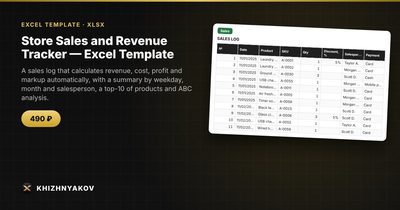
The Store Sales and Revenue Tracker is a paid Excel template that implements everything above. It has four sheets: "Lists" (products with SKU, name, category, purchase and retail price, plus salespeople, payment methods and ABC thresholds), "Sales" (up to 3000 rows with date, product from the list, quantity, discount, salesperson and payment; price, revenue, cost, profit and markup are calculated), "ABC analysis" (a product ranking by revenue with share, cumulative share and group A, B or C) and "Summary" (totals, breakdown by weekday, month, salesperson and payment method, a top 10 of products and four charts).
The ABC thresholds default to 80% and 15%, and you can change them on the "Lists" sheet. The file holds 3000 sales rows and 200 products, which for a small shop covers a year or more. It comes as a blank spreadsheet and a filled-in sample with fictional data. It works in Excel 2007 and later and LibreOffice, with no macros. It suits owners and managers of small shops, retail outlets and online stores, and sole traders. Calculations are approximate.
FAQ
How often should I redo the ABC analysis?
Quarterly for a stable range, monthly for fast-changing ones. Seasonal products will move between groups through the year.
What do I do with group C products?
Look at them one by one. Some are traffic builders or necessary add-ons. Others sit on the shelf and tie up cash, and those are the ones to discount or drop.
Should I enter every single sale?
If you have a POS system, export its daily totals per product and paste them in. If not, enter sales at the end of each day.
Can I include returns?
Enter a return as a row with a negative quantity, so revenue and cost reduce correctly.